
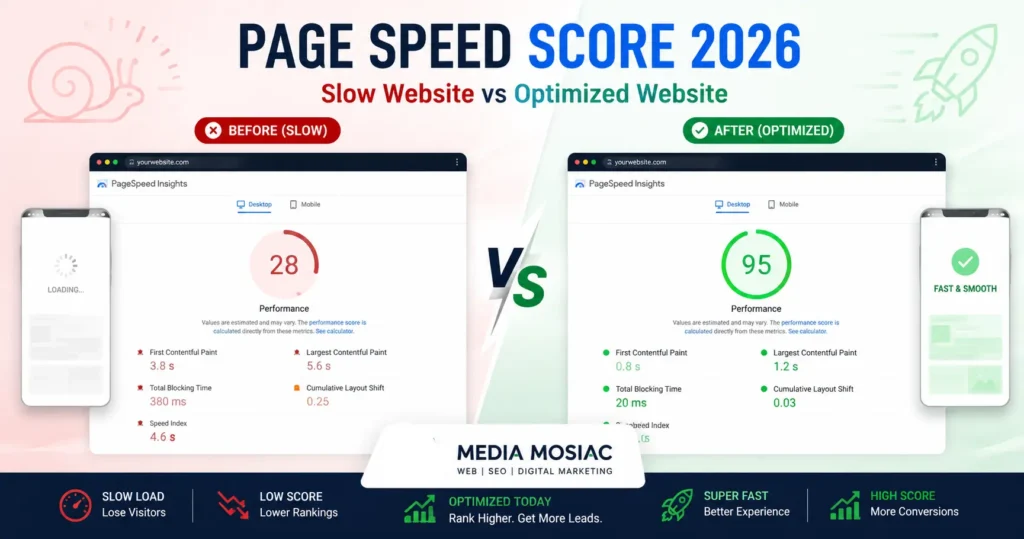
How to Achieve a 90+ PageSpeed Score in 2026
Your complete, step-by-step roadmap to blazing-fast website performance — from image optimization to server configuration — for Kashmir businesses, artisans, and small brands.
In 2026, a slow website is not just an inconvenience — it is a direct path to losing customers, dropping rankings, and burning your advertising budget. Whether you sell handcrafted Kashmiri shawls online, run a local hospitality brand, or offer artisan products through your e-commerce store, Google measures your site speed and uses it as a ranking signal. A 90+ score on Google PageSpeed Insights means faster load times, better conversions, and higher search visibility. This guide breaks it all down — clearly, practically, and without technical jargon.
What Is Google PageSpeed Score — And Why Does It Matter in 2026?
Google PageSpeed Insights (PSI) is a free tool that analyses your website's performance on both mobile and desktop. It assigns a score between 0 and 100 based on real-world user experience data and lab diagnostics powered by Lighthouse.
In 2026, Google's algorithm places even greater weight on Core Web Vitals — the three primary performance metrics that measure loading speed, interactivity, and visual stability. Failing these metrics means lower rankings, even if your content is excellent.
Measures loading speed. Target: < 2.5s
Measures responsiveness. Target: < 200ms
Measures visual stability. Target: < 0.1
First visible content. Target: < 1.8s
Why Kashmiri Artisans and Small Business Owners Should Care
If you sell handmade crafts, saffron, Pashmina shawls, dry fruits, or local hospitality services online, your website is your digital storefront. Unlike a physical shop in Lal Chowk or Sopore, your online store competes globally — and Google decides whether customers find you or your competitor first.
- A slow site on mobile pushes your listing below faster competitors in Google Search
- Poor PageSpeed directly increases your Google Ads cost-per-click (CPC)
- International buyers on slower mobile networks abandon slow sites instantly
- WhatsApp-shared links to a slow product page lose sales before the page even loads
- A 90+ score builds trust — customers associate speed with professionalism
At Media Mosiac's website development services , we have helped dozens of local Kashmir brands go from red scores to green — and see measurable improvements in traffic, enquiries, and sales as a result.
How to Achieve a 90+ PageSpeed Score: 10 Proven Steps for 2026
These are not generic tips — these are the exact steps our team at Media Mosiac applies on every website we build or optimise. Follow them in order for the best results.
Optimise and Convert All Images to WebP or AVIF
Images are the single biggest cause of slow load times. Convert every image on
your site to WebP or AVIF format — they are 30–70% smaller
than JPEG/PNG with the same visual quality. Use tools like
Squoosh or
install the Imagify or ShortPixel WordPress plugin.
Always add descriptive alt text for accessibility and SEO.
Implement a Caching Plugin (Server + Browser Cache)
Caching stores a static copy of your pages so WordPress does not rebuild them from scratch on every visit. Use WP Rocket (paid) or LiteSpeed Cache / W3 Total Cache (free). Enable both page caching and browser caching. This one step alone can boost your score by 10–20 points.
Use a Content Delivery Network (CDN)
A CDN delivers your website's static files (images, CSS, JS) from the server closest to your visitor. Cloudflare offers a free tier that significantly reduces load times for international visitors. For Kashmir businesses targeting buyers in Delhi, Dubai, or London, a CDN is non-negotiable.
Minimise and Defer CSS, JavaScript, and HTML
Every unnecessary character in your code wastes loading time. Enable minification via your caching plugin to strip whitespace and comments from CSS/JS files. Defer non-critical JavaScript so it loads after the visible page content renders. Remove unused CSS with tools like PurifyCSS or your page builder's built-in asset manager.
Choose a Fast, Lightweight WordPress Theme
Many popular WordPress themes load dozens of scripts and stylesheets by default — even on pages that don't use those features. Switch to performance-first themes like Astra, GeneratePress, or Kadence. These themes score 90+ out of the box with zero content added. Avoid heavy page builders with bloated code unless they provide asset-loading controls.
Enable GZIP or Brotli Compression on Your Server
Compression reduces the size of HTML, CSS, and JS files transferred from your server to the browser — by up to 70%. Most modern hosts support Brotli compression, which is more efficient than GZIP. Enable it via your hosting control panel (cPanel / .htaccess) or ask your host to activate it. Verify at GiftOfSpeed's GZIP tester .
Fix Cumulative Layout Shift (CLS) Issues
CLS occurs when page elements move as the page loads — frustrating users and
triggering Google penalties. The most common causes are: images without
width and height attributes, ads loading above
content, and fonts swapping late. Fix this by always specifying image
dimensions and using font-display: optional or
font-display: swap in your CSS.
Upgrade Your Hosting to LiteSpeed or NVMe-Based Servers
Shared hosting on old Apache servers is the hidden killer of PageSpeed scores. For 2026, move to a host offering LiteSpeed Web Server, NVMe SSD storage, and PHP 8.2+. Providers like Hostinger, Kinsta, or SiteGround offer affordable managed WordPress hosting with dramatically faster server response times (TTFB under 200ms).
Lazy Load Images and Iframes
Lazy loading tells the browser to only load images and videos that are
visible on screen — not the entire page at once. In WordPress, this is
enabled by default since version 5.5 via the native
loading="lazy" attribute. Ensure your theme does not override
this. For iframes (YouTube embeds, Google Maps), use a facade or replace
with a lightweight thumbnail + click-to-load approach.
Reduce HTTP Requests by Combining and Eliminating Plugins
Every plugin installed on WordPress adds HTTP requests — scripts, stylesheets, and database queries. Audit your plugins quarterly. Remove any plugin that provides functionality your theme or another plugin already covers. Use Query Monitor to identify slow plugins, and merge CSS/JS files where possible using your caching plugin's file combination feature.
Core Web Vitals 2026 Benchmarks at a Glance
Use this table to quickly identify which metrics need improvement on your site:
| Metric | Good ✅ | Needs Improvement ⚠️ | Poor ❌ | Primary Fix |
|---|---|---|---|---|
| LCP Largest Contentful Paint | ≤ 2.5s | 2.5–4.0s | > 4.0s | Optimize hero image, improve server TTFB |
| INP Interaction to Next Paint | ≤ 200ms | 200–500ms | > 500ms | Reduce JavaScript execution time |
| CLS Cumulative Layout Shift | ≤ 0.1 | 0.1–0.25 | > 0.25 | Set image dimensions, avoid dynamic content insertion |
| FCP First Contentful Paint | ≤ 1.8s | 1.8–3.0s | > 3.0s | Remove render-blocking resources |
| TTFB Time to First Byte | ≤ 200ms | 200–800ms | > 800ms | Upgrade hosting, enable server caching |
Best Free Tools to Test and Improve Your PageSpeed Score in 2026
Before fixing anything, measure it. These tools give you accurate, actionable reports — and most are completely free:
The official benchmark. Test both mobile and desktop. Free.
Detailed waterfall charts + video of page load. Pinpoints slow resources.
Test from real devices in real global locations including India.
Measures network performance and TTFB from your CDN nodes.
In-browser testing. No upload needed. Great for development.
Real user Core Web Vitals data from your actual website visitors.
Top WordPress Plugins for PageSpeed Optimisation in 2026
Caching & Performance
- WP Rocket — The gold standard. Handles caching, minification, lazy loading, and CDN integration in one plugin
- LiteSpeed Cache — Free and incredibly powerful if your host runs LiteSpeed Server (recommended)
- W3 Total Cache — Highly configurable free option for advanced users
Image Optimisation
- Imagify — Automatically converts and compresses images on upload with WebP support
- ShortPixel — Excellent AVIF support + bulk optimization for existing media library
- Smush — Free tier suitable for small sites, auto-lazyload included
Database & Code Optimisation
- Asset CleanUp Pro — Disable unnecessary CSS/JS on specific pages for surgical optimization
- WP-Optimize — Database cleaning + minification combo
- Flying Scripts — Delay non-critical JavaScript until user interaction
Choosing the Right Hosting: The Foundation of a 90+ Score
No amount of plugin optimization can overcome slow hosting. Your server's response time (TTFB) directly impacts your LCP score. Here is what to look for in 2026:
For Kashmir-based businesses targeting Indian and international customers, we recommend hosts with Mumbai or Singapore data centres combined with Cloudflare's CDN for global delivery. Our team at Media Mosiac can migrate your existing site to a faster host without downtime — contact us for a free assessment.
Advanced Performance Tactics for Power Users (2026)
Once you have the basics in place and are sitting at 75–85, these advanced tactics will push you into the 90+ green zone:
Preload Critical Resources
Add <link rel="preload"> hints for your hero image, critical fonts,
and above-the-fold CSS. This tells the browser to fetch them before it even
discovers them in the HTML. Most caching plugins offer this as a setting, or
you can add it manually to your theme's functions.php.
Use Variable Fonts to Reduce Font Requests
Instead of loading separate font files for Bold, Regular, and Italic, a single
variable font file handles all weights. Google Fonts added variable font support
for most popular typefaces. Load fonts with font-display: optional
to completely eliminate layout shift.
Implement Critical CSS (Above-the-Fold Inlining)
Extract the CSS needed to render the visible page area and inline it directly
in the <head>. Load the full stylesheet asynchronously.
Tools like Critical (npm) or WP Rocket's critical CSS feature
automate this. This alone can improve your FCP by 0.5–1.5 seconds.
Remove Render-Blocking Third-Party Scripts
Google Analytics, Facebook Pixel, WhatsApp Chat widgets, and live chat tools
all add render-blocking scripts. Load them after the main page content renders
using async or defer attributes, or use a tag manager
with delayed loading (WP Rocket's "Delay JavaScript" feature handles this
automatically).
Self-Host Google Fonts
Loading fonts from Google's servers adds a DNS lookup and external HTTP request. Download your fonts, host them on your server, and reference them in your CSS. Use the Google Webfonts Helper to generate the correct CSS. This removes a render-blocking external request entirely.
Mobile-First Optimisation: Why Your Score on Mobile Matters More
Google uses mobile-first indexing — meaning your mobile score directly determines your search ranking, even for desktop searchers. With over 75% of Kashmir's internet traffic coming from mobile devices, this is critical.
- Use responsive images with the
srcsetattribute to serve smaller images on mobile - Avoid large Cumulative Layout Shifts caused by ads or pop-ups loading after page content
- Test your site on real mobile devices using BrowserStack or Chrome DevTools device emulation
- Ensure tap targets (buttons, links) are at least 48×48px for touch accessibility
- Eliminate horizontal scroll — it kills mobile UX and signals poor optimisation
- Use
<meta name="viewport" content="width=device-width, initial-scale=1">
How Media Mosiac Can Help You Achieve and Maintain a 90+ Score
Achieving a 90+ PageSpeed score is not a one-time task — it requires ongoing monitoring, updates, and technical expertise. At Media Mosiac, we offer:
- Free website speed audit — we analyse your current score and identify every bottleneck
- Full technical SEO implementation including Core Web Vitals optimisation
- Custom WordPress development with performance-first architecture from day one
- Hosting migration to LiteSpeed servers with zero downtime
- Monthly maintenance packages to keep your score in the green zone year-round
We specialise in working with Kashmir-based artisans, local brands, and small e-commerce sellers who want a professional, fast, and visible online presence without the confusion of technical jargon. Explore our SEO services or digital marketing packages designed for Kashmir businesses.
Frequently Asked Questions About PageSpeed Score
What is a good PageSpeed score in 2026?
A score of 90–100 is considered excellent and qualifies as a "Good" rating by Google. Scores between 50–89 need improvement, and anything below 50 is classified as Poor. In 2026, with Google's increased focus on Core Web Vitals, aiming for 90+ on both mobile and desktop is the recommended target for any business website.
Does PageSpeed score directly affect Google rankings?
Yes. Since Google's Page Experience update and the Core Web Vitals rollout, page speed is an official ranking signal. Sites that meet the Core Web Vitals thresholds (LCP, INP, CLS) receive a ranking boost. A poor score will not disqualify you from ranking, but it makes it significantly harder to compete against faster sites with similar content quality.
Why is my PageSpeed score lower on mobile than desktop?
Mobile PageSpeed is tested using a simulated mid-range Android phone on a slow 4G connection — this closely mirrors real-world conditions for users in developing markets including India and Kashmir. Desktop tests assume a faster connection and more powerful processor. The gap is normal, but your mobile score must still reach 90+ since Google indexes your mobile version first.
How long does it take to improve a PageSpeed score?
Basic optimisations (image compression, caching, minification) can show results within hours. More complex fixes like server migration, theme rebuilding, or critical CSS implementation may take 1–3 days for a professional to complete. At Media Mosiac, our standard speed optimisation package takes 3–5 business days and typically moves sites from 40–60 scores to 85–95+.
Can I achieve a 90+ score on shared hosting?
Yes — but it depends on the host. Shared hosting on providers that use LiteSpeed Web Server (like Hostinger or A2 Hosting's LiteSpeed plans) can achieve 90+ with proper optimisation. Old Apache-based shared hosting with high server load and slow TTFB makes 90+ extremely difficult to achieve regardless of other optimisations. Upgrading to managed WordPress hosting is usually the single highest-ROI investment for speed.
How often should I check my PageSpeed score?
Check your score after every major update — plugin updates, theme changes, adding new content with images or videos, or changing your hosting environment. For businesses actively investing in SEO, a monthly audit is recommended. Google Search Console's Core Web Vitals report provides ongoing real-user data that complements lab-based tools like PageSpeed Insights.
Your 90+ PageSpeed Score Checklist — Print and Keep
- All images converted to WebP or AVIF with descriptive alt text
- Caching plugin installed and configured (WP Rocket, LiteSpeed Cache, or W3TC)
- CDN enabled (Cloudflare free tier minimum)
- CSS, JS, and HTML minified and combined where possible
- GZIP or Brotli compression active on server
- Render-blocking CSS/JS deferred or eliminated
- Hosting upgraded to LiteSpeed + NVMe with PHP 8.2+
- Lazy loading active on all images and iframes
- Hero image preloaded with
<link rel="preload"> - Google Fonts self-hosted or loaded with
font-display: optional - All images have explicit width and height attributes (prevents CLS)
- Third-party scripts (Analytics, Pixels) loaded deferred or async
- Database cleaned of post revisions, spam, and transients
- Score tested monthly on PageSpeed Insights + GTmetrix
- Search Console Core Web Vitals report checked for field data issues
Is Your Website Costing You Customers?
Get a FREE website speed audit from Media Mosiac. We will identify exactly what is slowing your site, give you a priority action list, and show you what a 90+ score could do for your Google rankings — at no cost and no commitment.